

DEUNA iOS SDK2.12.2or higher is required.
Use the generateFraudId function or the fraudCredentials parameter to generate a DEUNA fraud payload using supported antifraud providers.
Only add the providers you plan to use.
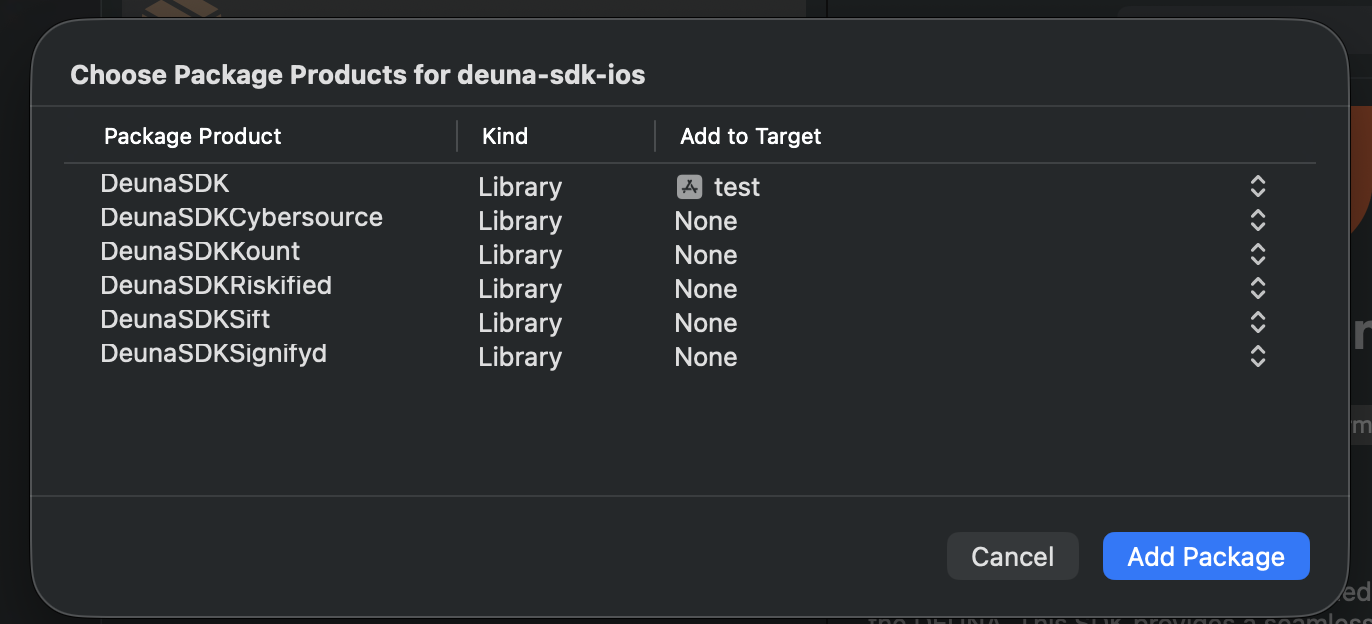
Swift Package Manager — selecting providers
When the "Choose Package Products" dialog appears, set the Add to Target column to your app target for DeunaSDK and any fraud provider product(s) you need. Leave unused providers set to None.
Supported providers
RISKIFIED
Required: storeDomain
Swift Package Manager: Add DeunaSDKRiskified to your app target.
CocoaPods:
pod 'DeunaSDK/Riskified'Example:
deunaSDK.generateFraudId(
    params: [
        "RISKIFIED": [
            "storeDomain": "yourdomain.com"
        ]
    ]
) { fraudId in
    // fraudId: Base64 JSON string (or nil)
}
CYBERSOURCE
Required: orgId, merchantId
Optional: fpServer (default: h.online-metrix.net)
Swift Package Manager: Add DeunaSDKCybersource to your app target.
CocoaPods:
pod 'DeunaSDK/Cybersource'Example:
deunaSDK.generateFraudId(
    params: [
        "CYBERSOURCE": [
            "orgId": "your_org_id",
            "merchantId": "your_merchant_id"
            // "fpServer": optional, default: "h.online-metrix.net"
        ]
    ]
) { fraudId in
    // fraudId: Base64 JSON string (or nil)
}
SIGNIFYD
Required: orgId
Swift Package Manager: Add DeunaSDKSignifyd to your app target.
CocoaPods:
pod 'DeunaSDK/Signifyd'Example:
deunaSDK.generateFraudId(
    params: [
        "SIGNIFYD": [
            "orgId": "your_org_id"
        ]
    ]
) { fraudId in
    // fraudId: Base64 JSON string (or nil)
}
KOUNT
Swift Package Manager: Add DeunaSDKKount to your app target.
CocoaPods:
pod 'DeunaSDK/Kount'SIFT
Swift Package Manager: Add DeunaSDKSift to your app target.
CocoaPods:
pod 'DeunaSDK/Sift'ACCERTIFY
Required: none (uses local bundle configuration files)
Server KeysIMPORTANT: The
server_keys_message_hosted.jsonfile and the configuration values forInMobile.plistare not public. You must request them directly from Accertify during merchant onboarding.
Swift Package Manager: Add DeunaSDKAccertify to your app target.
CocoaPods:
pod 'DeunaSDK/Accertify'Assets setup
The integration requires the following configuration files inside the Xcode project. Ensure both files are added to your main target and included in your app's Copy Bundle Resources:
server_keys_message_hosted.json: The public encryption keys file provided by Accertify.InMobile.plist: Property List file containing your merchant details and Endpoint URLs:
| Key | Type | Value |
|---|---|---|
accountID | String | YOUR_ACCOUNT_GUID |
registrationURL | String | YOUR_INMOBILE_ENDPOINT_URL |
logURL | String | YOUR_INMOBILE_ENDPOINT_URL |
serverKeyData | String | server_keys_message_hosted.json |
Example:
deunaSDK.generateFraudId(
    params: [
        "ACCERTIFY": [:]
    ]
) { fraudId in
    // fraudId: Base64 JSON string (or nil)
}
MERCADOPAGO
Required: none (params can be empty dictionary [:])
Swift Package Manager: Add DeunaSDKMercadoPago to your app target.
CocoaPods:
pod 'DeunaSDK/MercadoPago'Example:
deunaSDK.generateFraudId(
    params: [
        "MERCADOPAGO": [:]
    ]
) { fraudId in
    // fraudId: Base64 JSON string with nested Mercado Pago fingerprint object (or nil)
}
Call generateFraudId — full example
generateFraudId — full exampledeunaSDK.generateFraudId(
params: [
"RISKIFIED": [
"storeDomain": "yourdomain.com"
],
"CYBERSOURCE": [
"orgId": "your_org_id",
"merchantId": "your_merchant_id"
// "fpServer": optional, default: "h.online-metrix.net"
],
"ACCERTIFY": [:],
"MERCADOPAGO": [:]
]
) { fraudId in
// fraudId: Base64 JSON string (or nil)
}Pass fraud credentials to a widget (Optional)
Pass the fraud provider configuration directly to the widget via fraudCredentials. The SDK will generate the fraud ID internally and send it to DEUNA at purchase time — no need to call generateFraudId separately.
deunaSDK.initPaymentWidget(
    orderToken: "...",
    callbacks: PaymentWidgetCallbacks(),
    fraudCredentials: [
        "RISKIFIED": [
            "storeDomain": "yourdomain.com"
        ],
        "CYBERSOURCE": [
            "orgId": "your_org_id",
            "merchantId": "your_merchant_id"
        ],
        "SIGNIFYD": [
            "orgId": "your_org_id"
        ],
        "ACCERTIFY": [:]
    ]
)
Behavior notes
- Unknown providers are ignored.
- Invalid provider config is ignored.
- If no valid providers are sent, callback returns
nil. - The SDK runs provider initialization in parallel (best effort) and returns a Base64 JSON payload for valid requested providers.