

Use your web checkout in a mobile app.
Unify payments from all your channels on a single centralized web page.
To integrate the DENUNA Checkout into mobile applications, use a WebView component.
How it works
WebView is a component that allows embedding web content within a native mobile application.
Users access the payment flow directly within the app, without redirection to an external browser.
The payment page loads in the webView, maintaining the experience within the application environment.
Usually, you can use DEUNA's Web SDK on your sites to display Payment widgets.
When the website page is loaded in a WebView, some payment flows may not work correctly due to the inherent restrictions of a WebView on iOS and Android.
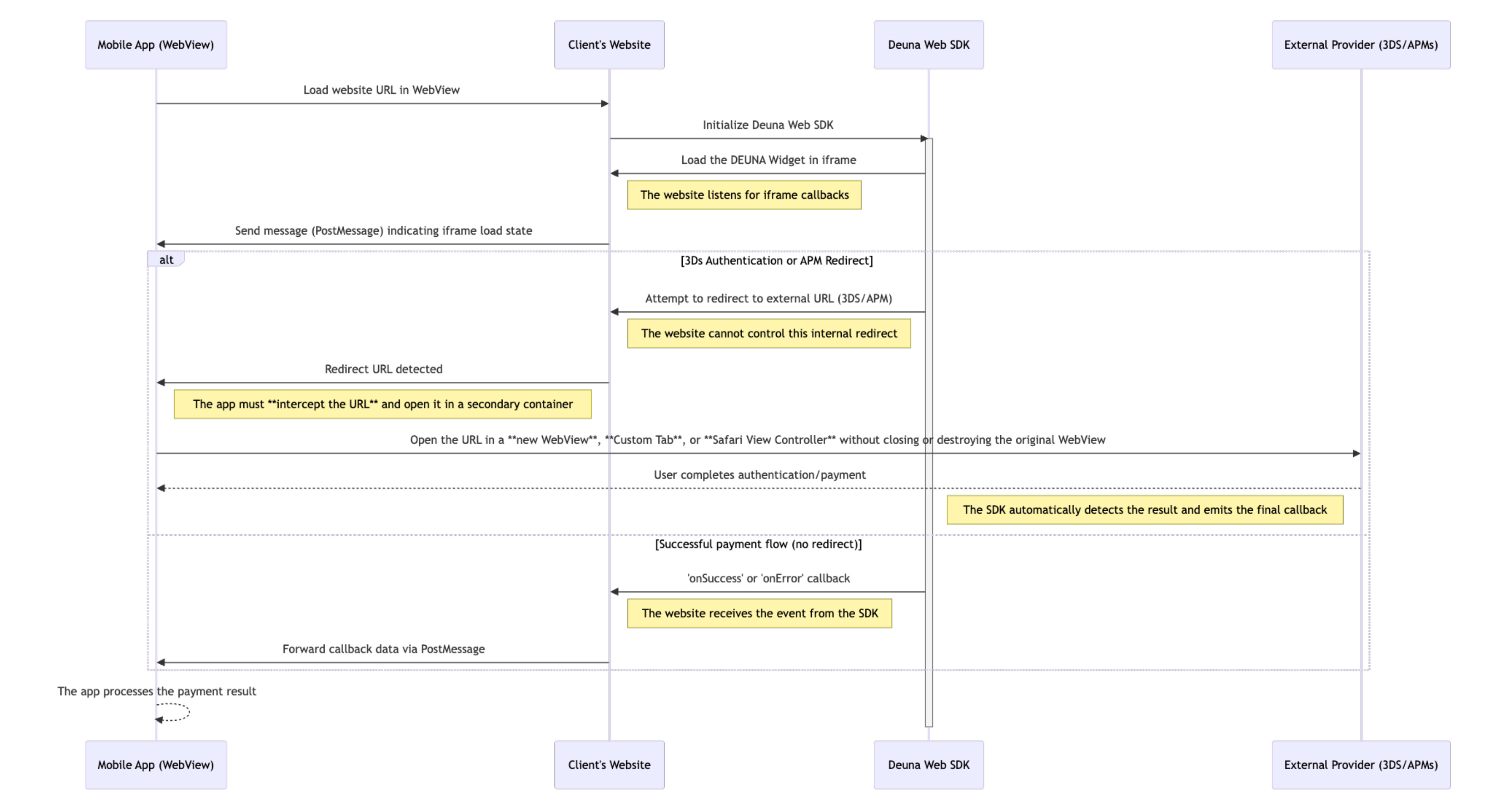
Common restrictions
A WebView might have the following restrictions:
JavaScript execution
By default, JavaScript execution might be blocked. This can cause problems when loading your website content, including Payment widgets.
To ensure full functionality, it's crucial to explicitly enable JavaScript in your WebView configuration.
Redirections to external links
Redirections to external links are blocked by default, either through window.open or by clicking a link.
This is a critical limitation for payment flows that require the user to be redirected to an external page to complete the transaction. Common examples include:
- 3D Secure Authentication (3DS): When the user's bank requires additional verification.
- Alternative Payment Methods (APMs): Payments that are processed through external platforms (such as PayPal or online banking services).
Intercept redirections and handle them appropriately. This could involve opening the link in the device's default browser or implementing a custom URL handling mechanism within the application
Communication between Web Checkout and the app
It's necessary to implement a bidirectional communication mechanism, such as PostMessages or WebSockets, to exchange data between your Web Checkout and the mobile application.
Requisites
Configure the following functionalities in your application:
- WebView configuration: Your WebView must be able to intercept redirection URLs, such as those used in 3DS flows, APMs, and other services.
- Communication between Web Checkout and the app: Implement a bidirectional communication mechanism to exchange data between your Web Checkout and the mobile application. Use PostMessages or WebSockets.
Custom WebView implementation
The following video demonstrates a Web Checkout in an iOS app using a WebView.
The website explore.deuna.io is loaded, which uses DEUNA's Web SDK to render the widgets.
Communication between the Web Checkout and the iOS app is managed through a custom WebView and PostMessages.
Access the complete source code of our custom WebView solution for each platform in the following repositories:
- iOS See example in: Examples/checkout-web-wrapper
- Android See example in: examples/checkout-web-wrapper
Communication between Web Checkout and mobile apps
The site explore.deuna.io uses a similar approach to the following to establish communication between the web checkout and mobile applications:
IMPORTANT: On standard web browsers, the payment widget utilizes
window.open()to handle Alternative Payment Method (APM) redirect URLs. The widget monitors the object returned by this function to detect when the redirected window is closed.WebView Behavior: In most WebView environments, calling
window.open()immediately returns an object with{ closed: true }. This causes the payment widget to prematurely assume the redirect process was terminated by the user, triggering a specific error in theonErrorcallback:{ "type": "PAYMENT_ERROR", "metadata": { "code": "TIMEOUT", "message": "Payment timeout" } }Required Action: If your integration is a WebView loading your website, you must ignore this specific
TIMEOUTerror to ensure the payment process is not interrupted while the user is still on the redirect page.
/**
 * Sends messages from Web Checkout to the native WebView.
 * @param {string} callbackName - Callback name (e.g., 'onSuccess')
 * @param {Object} data - Data to be transmitted
 * @param {string} widgetType - Widget type (e.g., 'paymentWidget')
 */
const sendMessage = (callbackName, data, widgetType) => {
  const payload = JSON.stringify({ callbackName, data, widgetType });

  // Platform-specific handlers
  window.webkit?.messageHandlers.deunaPayment?.postMessage(payload); // iOS
  window.deunaPayment?.postMessage(payload);                         // Android
  window.ReactNativeWebView?.postMessage(payload);                  // React Native
};

/**
 * Detects if the application is currently running inside a WebView.
 */
const isEmbeddedInWebView = !!(
  window.webkit?.messageHandlers?.deunaPayment ||
  window.deunaPayment ||
  window.ReactNativeWebView
);

// DEUNA Payment widget initialization
await DeunaSDK.initialize({
  ...,
  preloadWidgets: [
    orderToken: "<DEUNA_ORDER_TOKEN>",
    callbacks: {
      onSuccess: (data) => {
        sendMessage('onSuccess', data, 'paymentWidget');
    },
    onError: (data) => {
      // If the site is embedded in a WebView, the TIMEOUT error must be ignored
      const isTimeoutError =
        data.type === 'PAYMENT_ERROR' &&
        data.metadata?.code === 'TIMEOUT';

      if (isEmbeddedInWebView && isTimeoutError) {
        return;
      }

      sendMessage('onError', data, 'paymentWidget');
    },
    onEventDispatch: (event, data) => {
      sendMessage('onEventDispatch', { event, data }, 'paymentWidget');
    },
  },
]});
Window Open Interception
The DEUNA Payment Widget relies on the window.open(...) function to launch redirect URLs in new browser tabs. By default, it monitors the reference returned by this function to detect when a tab is closed.
In WebView environments (iOS/Android), window.open(...) does not function out-of-the-box. To handle this, we must override the function using JavaScript injection to open a new native webview instead.
The Challenge: Preventing False Timeouts
When a new webview is opened via an override, the Payment Widget may immediately receive a closed: true state.
If the payment widget detects that the "window" was closed, it triggers a 5-second timeout. If no payment success status is received within that window, the widget emits a purchaseError event with the code TIMEOUT, even if the user is still completing the transaction in the other view.
Implementation Strategy
To prevent premature timeouts, your custom window.open implementation must be injected such that it does not return any value (returning undefined).
By not returning a window reference or a "closed" state, the Payment Widget will not initiate the 5-second countdown, allowing the user to complete the payment process without interruption.
Example on React Native
/**
 * Sample React Native App
 * https://github.com/facebook/react-native
 *
 * @format
 */

import React, { useState } from 'react';
import {
  Modal,
  StyleSheet,
  Text,
  TouchableOpacity,
  View,
  StatusBar,
} from 'react-native';
import { WebView } from 'react-native-webview';
import { SafeAreaProvider } from 'react-native-safe-area-context';
import { WebViewOpenWindowEvent } from 'react-native-webview/lib/WebViewTypes';

function AppWrapperTest() {
  const [modalVisible, setModalVisible] = useState(false);
  const [newWindowUrl, setNewWindowUrl] = useState('');

  const handleWebViewMessage = (event: any) => {

  };

  const handleOpenWindow = (event: WebViewOpenWindowEvent) => {
    const { targetUrl } = event.nativeEvent;
    console.log('Opening window:', targetUrl);
    setNewWindowUrl(targetUrl);
    setModalVisible(true);
  };

  const closeModal = () => {
    setModalVisible(false);
    setNewWindowUrl('');
  };

  return (
    <SafeAreaProvider>
      <StatusBar barStyle="dark-content" />
      <View style={styles.container}>
        <WebView
          source={{ uri: 'https://explore.stg.deuna.io' }}
          style={styles.webview}
          javaScriptEnabled={true}
          domStorageEnabled={true}
          startInLoadingState={true}
          javaScriptCanOpenWindowsAutomatically
          setSupportMultipleWindows
          useWebView2
          onOpenWindow={handleOpenWindow}
          onMessage={handleWebViewMessage}
        />
      </View>

      {/* Modal WebView for new windows */}
      <Modal
        visible={modalVisible}
        animationType="slide"
        presentationStyle="pageSheet"
        onRequestClose={closeModal}
      >
        <SafeAreaProvider>
          <View style={styles.modalContainer}>
            <View style={styles.modalHeader}>
              <TouchableOpacity onPress={closeModal} style={styles.closeButton}>
                <Text style={styles.closeButtonText}>✕ Cerrar</Text>
              </TouchableOpacity>
            </View>
            <WebView
              source={{ uri: newWindowUrl }}
              style={styles.modalWebview}
              javaScriptEnabled={true}
              domStorageEnabled={true}
              startInLoadingState={true}
              onMessage={handleWebViewMessage}
              injectedJavaScript={injectedJavaScript}
            />
          </View>
        </SafeAreaProvider>
      </Modal>
    </SafeAreaProvider>
  );
}

const styles = StyleSheet.create({
  container: {
    flex: 1,
    paddingTop: StatusBar.currentHeight || 40,
  },
  webview: {
    flex: 1,
  },
  modalContainer: {
    flex: 1,
  },
  modalHeader: {
    height: 50,
    backgroundColor: '#f8f9fa',
    justifyContent: 'center',
    alignItems: 'flex-end',
    paddingHorizontal: 15,
    borderBottomWidth: 1,
    borderBottomColor: '#e9ecef',
  },
  closeButton: {
    padding: 10,
  },
  closeButtonText: {
    fontSize: 16,
    color: '#007AFF',
    fontWeight: '600',
  },
  modalWebview: {
    flex: 1,
  },
});

export default AppWrapperTest;