

3DS purchase
Make a purchase payment with 3DS in DEUNA.
1. Generate a payment
To create a payment, you can use the following two flows:
2. Use the payment response
In the payment response, you can see the following fields that are necessary to know that said charge requires the end user to authenticate:
{
    "order": {
        "order_id": "75029759-4a64-42cd-b0b6-9f12777707b7",
        "currency": "USD",
        "total_amount": 3150,
        // ...
        "status": "pending", // status of the order will be "pending"
        "payment": {
            "data": {
             		// ...
                "method_type": "credit_card",
                "id": "75029759-4a64-42cd-b0b6-9f12777707b7",
                "processor": "kushki",
                "status": "pending_3ds", // note here the payment status
                "authorization_3ds": {
                    "version": "3DS2",
                    "url_challenge": "https://api.stg.deuna.io/transactions/view_challenge?token=01HC0XG8GA2GH5G684QW572507"
                }
            }
        }
    }
}
3DS fields
The important fields to consider are:
- The order status (
order.status) ispending, because it has not been paid yet. - The payment status (
payment.data.status) ispending_3ds. This status indicates that it's waiting for authentication by the cardholder. - For
challengetype authentication cases (the user must take an action during authentication) orfrictionless(the user is presented with the 3DS flow but doesn't need to take an action), thepayment.data.next_action.authorization_3ds.urlproperty will contain the URL of the web page that should be presented to the buyer. For compatibility with previous integrations, it can also be found in thepayment.data.authorization_3ds.url_challengefield.
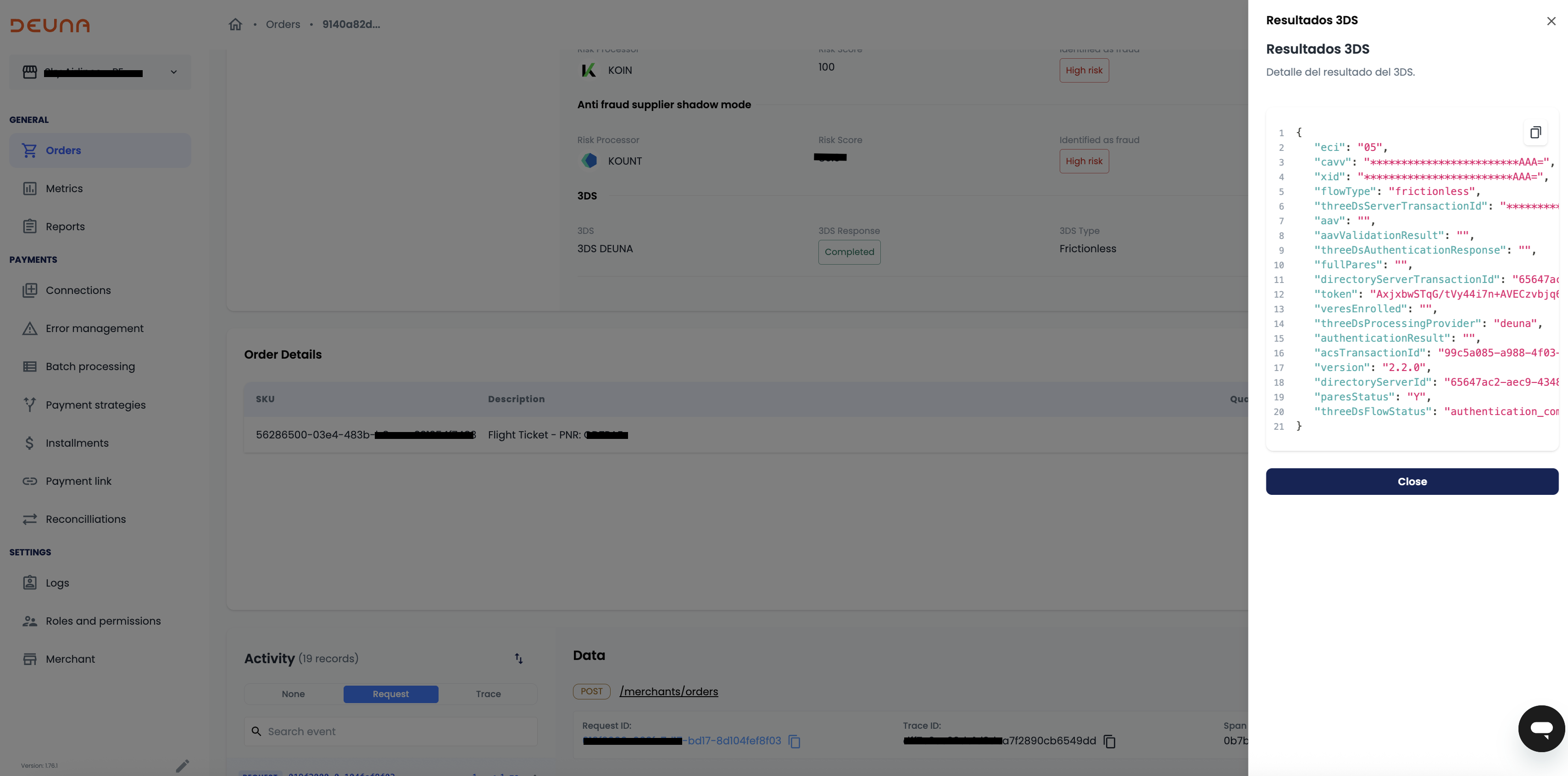
In the Admin portal, go to the Order Details page.
In the Security section, under 3DS, click on 'See details' to view the 3DS response details. The fields are:
| Field Name | Description |
|---|---|
eci | Electronic Commerce Indicator (ECI) is a value returned by the Directory Server and ACS indicating the outcome of authentication requested on transactions for EMV 3-D Secure. |
cavv | CAVV provides evidence that cardholder authentication occurred or that the merchant attempted authentication. A CAVV is unique for each authentication transaction. For Visa Secure, the AAV is named CAVV. |
xid | XID, or Transaction ID, is a unique identifier for 3DS transactions, linking it to authentication details and used for tracking and reconciling transactions. |
flow_type | If is Challenge or Frictionless. |
three_ds_server_transaction_id | The unique transaction ID generated by the 3D-Secure server, used to track the transaction throughout the authentication process. |
aav | Accountholder Authentication Value (AAV). Formally called Universal Cardholder Authentication Field (UCAF), applicable for Mastercard and Maestro e-commerce transactions only. |
aav_validation_result | The result of Accountholder Authentication Value (AAV) validation. |
three_ds_authentication_response | The Payer Authentication Response (PARes) Status, a transaction status result identifier. Values: Y – Successful Authentication. N – Failed Authentication. U – Unable to Complete Authentication. A – Successful Stand-In Attempts Transaction. |
full_pares | The full/complete (Payer) Authentication Response. It contains (AcqBIN)(MerID)(XID)(Date)(PurchaseAmount)(PAN)(AuthDate)(Status)(CAVV)(ECI). |
directory_server_transaction_id | Unique identifier generated by the Directory Server to identify a specific 3DS transaction on the DS side. |
token | Token occasionally generated by the PSP (Payment Service Provider). |
veres_enrolled | Result of the enrollment check. Possible values: Y – Card enrolled or can be enrolled; authentication required; liability shift applies. N – Card not enrolled; proceed with authorization; liability shift applies. U – Unable to authenticate; no liability shift. |
three_ds_processing_provider | Specifies who's carrying the 3DS process from DEUNA's perspective. Possible values: 'psp_own' – The native 3DS offering from a PSP. 'deuna' – DEUNA's 3DS offering. |
authentication_result | Raw authentication data from the card-issuing bank. Indicates if authentication was successful and if liability shift occurred. Possible values: -1 – Invalid PARes. 0 – Successful validation. 1 – Cardholder is not participating, but the authentication attempt was recorded. 6 – Issuer unable to perform authentication. 9 – Cardholder did not complete authentication. |
acs_transaction_id | Unique transaction identifier assigned by the ACS to identify a single transaction. |
version | Version of the 3D-Secure protocol (e.g., 2.0, 2.1.0, etc.). |
directory_server_id | Identifier of the directory server. The Directory Server enables communication between the 3DS Server and the ACS, validates and routes 3DS messages to authenticate the cardholder. |
pares_status | The Payer Authentication Response (PARes) Status, a transaction status result identifier. |
3. Render the url_challenge
url_challengeRender the url_challenge from the acquirer`s page.
4. Redirect the user
Once authentication is finished, redirect the user to your callback_urls or to a default page.
For Direct API integrations, you are responsible for redirecting the user to that page or in case of mobile opening that page in a webView.
Use of 3DS Next action widget
For Direct API integrations where redirection management is not desired, use the 3DS Next action widget.
Depending on the payment provider and MPI, the URL must be opened in a completely new tab and not in an iFrame. Check with DEUNA to indicate according to the provider you're going to use.
If you use 3DS Next action widget and the payment provider or MPI supports the use of iFrame, ask DEUNA to configure the widget to render as iFrame instead of requiring redirection.
If you use widgets, then the widgets will be responsible for redirection or iFrame rendering and interpreting when the 3DS flow is required.
If you want to use callback_urls, then contact your implementation manager to activate this functionality.
Use of callback_urls:
Configure callbacks in:
- Forpurchase V1: send the
callback_urlsin the fieldspecific_fields.callbacks. - Forpurchase V2: send the
callback_urlsin the fieldcallback_urls.
Use of widgets
As your server only responsible for creating the order, the urls can be passed in the callback_urls field.
DEUNA default page
The user is redirected to the following web page if you do not use callback_urls after authentication:
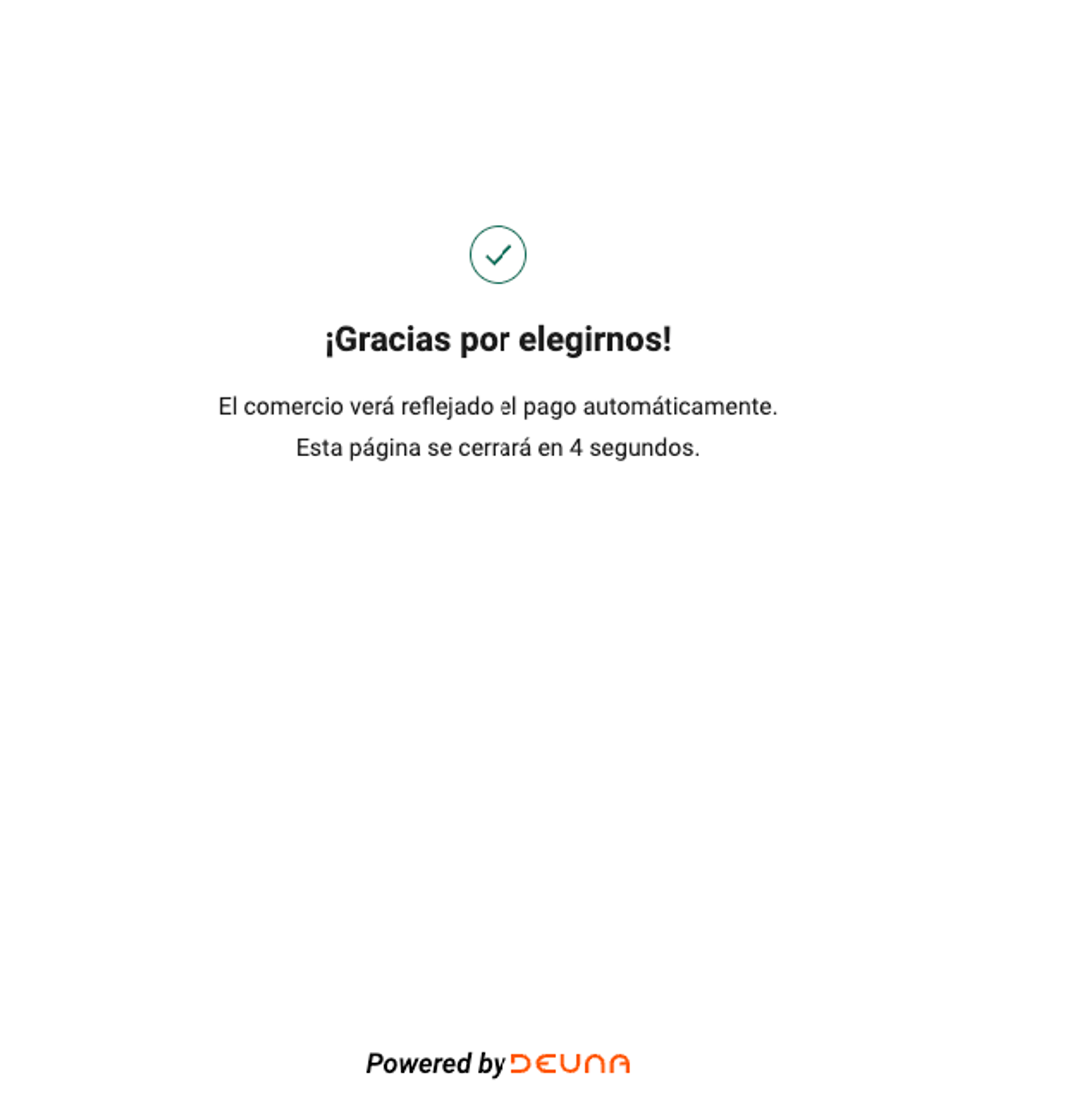
Depending on the issuing bank, different challenge pages are obtained, but the redirection flow remains the same.
Authentication Timeouts
- During a 3-D Secure flow, shoppers may be asked to complete an authentication challenge—for example, by entering a one-time password or approving the transaction in their banking app. This challenge must be completed within a limited timeframe before it expires.
- The issuing bank controls the shopper's authentication experience. Most banks set relatively short time windows—typically between 3 and 5 minutes—to encourage prompt action. While the shopper is authenticating, the transaction remains in status
pending_3ds. - Since challenge timeouts vary between issuing banks, DEUNA allows a maximum of 10 minutes for the authentication process to complete. During this period, the transaction status remains
pending_3dsuntil the shopper either completes or abandons the challenge. - If the shopper does not complete the authentication challenge within the allowed timeframe, the transaction will fail due to timeout. In this scenario, the transaction status will be updated to
denied, and the shopper must restart the checkout process.
5. Check the final payment status
DEUNA provides two ways to know the final payment status after 3DS authentication:
- Perform long polling of the Get Order API
- Listen to DEUNA webhooks
DEUNA recommends implementing both processes, so that you can either listen to webhooks or use long polling in case the server has intermittency.
6. Frictionless 3D-Secure
In the frictionless flow, the user is not requested any type of authentication verification when making the payment, since the ACS (Access Control Server) has validated the user's authenticity with the data provided in the purchase.
This provides a smoother experience for the user, increasing the payment approval rate and decreasing fraud.
To execute a successful Frictionless 3D-Secure purchase, collect certain information about the user such as:
- Full billing address
- Device fingerprint
- IP address
- Browser details
- Other relevant information about the user.
Example response
{
  "order": {
    "order_id": "75029759-4a64-42cd-b0b6-9f12777707b7",
    "currency": "USD",
    "total_amount": 3150,
    // ...
    "status": "succeeded",
    "payment": {
      "data": {
        // ...
        "method_type": "credit_card",
        "id": "75029759-4a64-42cd-b0b6-9f12777707b7",
        "processor": "kushki",
        "status": "processed"
      }
    }
  }
}
7. 3DS Data Only
Currently not supported.
This section provides an overview of the 3D Secure Data Only flow and how it works within DEUNA.
Overview
- 3DS Data Only is a variant of the 3D Secure 2 (3DS2) protocol that allows merchants to share shopper data with card schemes — Visa and Mastercard — without triggering a full authentication request to the issuer.
- In a standard 3DS2 flow, the shopper must be authenticated by the card issuer before the payment can be authorized. In a data-only flow, the same 3DS2 infrastructure is used exclusively to transmit shopper and device data to the card scheme.
- The card scheme performs its own risk evaluation and forwards that assessment to the issuer alongside the authorization message. The issuer uses this enriched data to make a more informed authorization decision.
- Because no authentication challenge is triggered, the shopper experience remains uninterrupted.
- Since no authentication takes place, there is no liability shift for transactions processed through the data-only flow.
- The primary benefit of this flow is improved authorization rates: by providing issuers with richer transaction context, merchants reduce the likelihood of legitimate payments being declined due to insufficient risk data.
Since no authentication takes place, there is no liability shift for transactions processed through the 3DS data-only flow
Supported card schemes
- Visa
- Mastercard
How it works
- DEUNA collects shopper and device data at the time of payment.
- The data is submitted to the card scheme through the 3DS2 protocol, without initiating an issuer authentication challenge.
- The card scheme evaluates the risk of the transaction using the submitted data.
- The risk evaluation is included in the authorization message sent to the issuer.
- The issuer uses this enriched data to improve its authorization decision.
- If authorized, the shopper receives a payment confirmation.
The shopper does not see any 3DS challenge during this process.
Required data fields
- 3DS Data Only uses the same data fields already submitted in your existing 3DS integration — payer information, billing address, card data, and order data (amount and currency).
- Submitting incomplete or placeholder data reduces the quality of the risk signal sent to the card scheme and may negatively impact authorization rates.
- As in the regular 3DS flow, the Device information (browser data, screen resolution, user agent) is required for the 3DS Data Only flow. If you are using DEUNA's frontend, this data is collected automatically.
Considerations and limitations
- 3DS Data Only is available for Visa and Mastercard only.
- There is no liability shift associated with the data-only flow. In the event of a dispute, the merchant retains liability.
- The flow does not present an authentication challenge to the shopper.
- Submitting empty or placeholder values in any required field reduces the effectiveness of the data submission and may negatively impact authorization rates.
Enabling 3DS Data Only in DEUNA
- To activate 3DS Data Only for your integration, contact DEUNA. Once enabled, the flow is triggered automatically based on the transaction context and card scheme eligibility.
- No additional integration is required on the merchant side. 3DS Data Only works on top of your existing DEUNA payment integration. Once the feature is enabled, DEUNA handles the data submission to the card scheme transparently as part of the payment flow.
No additional integration is required on the merchant side. 3DS Data Only works on top of your existing DEUNA payment integration.
8. 3D Secure Authentication: Understanding ECI & Authentication Results
When a transaction goes through 3DS, the result is captured in two key values:
- ECI (Electronic Commerce Indicator): tells the card network how the authentication was completed.
- PARes Status: the outcome of the authentication challenge.
These values determine whether liability for fraud shifts from your business to the card issuer.
8.1 What is Liability Shift?
When a payment is authenticated through 3DS and a fraud-related chargeback occurs, the financial liability can transfer from the merchant to the issuing bank. This means your business is protected against fraudulent chargebacks on those transactions.
Liability shift applies to fraud disputes only — it does not cover other chargeback reasons such as item not received or service not as described.
8.2 PARes Status Values
| Value | Meaning | What it means for your business |
|---|---|---|
Y | Authenticated | The cardholder successfully verified their identity. Strongest protection available. |
A | Attempted | The card is enrolled in 3DS, but the card issuer does not support 3DS 2. The card network performed stand-in authentication on the issuer's behalf. |
N | Failed | Authentication failed. The transaction should not be processed. |
U | Unable to authenticate | The issuer could not complete the process (e.g., technical error on their side). |
R | Rejected | The issuer rejected the authentication request without presenting a challenge. |
C | Challenge required | The cardholder needs to complete an additional step before authentication is confirmed. |
I | Informational/ Data Only | The transaction was processed as a data-sharing authentication — either through a Data Only flow (Visa or Mastercard) or following a TRA/Low Value exemption where the issuer accepted the request without a challenge. There is no liability shift — proceed with authorization normally. |
8.3 ECI Values and Liability Shift by Card Network
Visa/ Amex/ Diners/ Discover
| ECI | What happened | Liability shift? |
|---|---|---|
05 | Cardholder fully authenticated via Visa Secure | ✅ Yes |
06 | Authentication was attempted — cardholder or issuer did not complete | ✅ Yes, if authentication value (CAVV) is present |
07 | No authentication — standard e-commerce transaction | ❌ No |
Mastercard
| ECI | What happened | Liability shift? |
|---|---|---|
02 | Cardholder fully authenticated via Mastercard Identity Check | ✅ Yes |
01 | Authentication was attempted — cardholder or issuer did not complete | ✅ Yes, if authentication value (AAV) is present |
00 | No authentication or failed | ❌ No |
The authentication value (CAVV/AAV) must be present for liability shift to apply on attempted authentication (ECI06/01). DEUNA handles this automatically — no action required on your end.
8.4 Common Scenarios
✅ Full authentication — maximum protection
The cardholder completed the 3DS challenge successfully.
- PARes Status:
Y - ECI:
05(Visa, Amex, Diners) or02(Mastercard) - Result: Fraud chargebacks shift to the issuer.
- DEUNA sends the authentication result to the authorization step.
✅ Attempted authentication
Your integration attempted 3DS, but the cardholder or issuer did not complete authentication. This is common when a card is enrolled but the issuer's system responds with an attempt token instead of a full challenge.
- PARes Status:
A - ECI:
06(Visa, Amex, Diners) or01(Mastercard) - Result: Liability shift still applies as long as the authentication value (CAVV/AAV) is present. DEUNA always sends the CAVV/AVV.
- DEUNA sends the authentication result to the authorization step.
This is the most common scenario for transactions processed in Latin America, where issuer participation in 3DS varies.
❌ Card not enrolled
The card is not registered in the card network's 3DS program.
- PARes Status: not applicable
- ECI:
07 - Result: No liability shift. The transaction proceeds as a standard e-commerce payment and the merchant retains fraud liability.
- DEUNA don't sends the authentication result to the authorization step.
❌ Authentication failed
The cardholder did not pass authentication — for example, they entered the wrong OTP or cancelled the challenge.
- PARes Status:
N - ECI:
07 - Result: The transaction should not be processed. DEUNA will return an error to prevent unauthorized charges.
- DEUNA don't sends the authentication result to the authorization step.
⚠️ Unable to authenticate
The issuer's authentication system was temporarily unavailable.
- PARes Status:
U - ECI:
07 - Result: No liability shift. Depending on your risk configuration, the transaction may still proceed — but at your own risk.
- DEUNA don't sends the authentication result to the authorization step.
ℹ️ Informational authentication - Data Only or exemption accepted
The transaction was processed through a data-sharing flow, or the issuer accepted a challenge exemption request. No challenge was shown to the cardholder.
- PARes Status: I
- ECI: 07 (Visa Data Only, Visa TRA Low Value) or 06 (Mastercard TRA Low Value, 3DS 2.2 only)
- CAVV: Present — DEUNA includes it in the authorization request automatically
- Result: No liability shift. The goal of this flow is to improve authorization rates by providing richer transaction data to the issuer — not to obtain fraud protection.
- Since this is a merchant-configured setting, DEUNA sends the authentication result to the authorization step.
This status appears when 3DS Data Only is enabled, or when a low-value transaction exemption is active (SCA). No action is required on your end — DEUNA handles it automatically.
8.5 Quick Reference
| ECI | Visa | Mastercard | Amex | Diners | Liability shift? |
|---|---|---|---|---|---|
05 | Full auth | — | Full auth | Full auth | ✅ Yes |
06 | Attempted | — | Attempted | Attempted | ✅ Yes (with CAVV) |
07 | No auth | — | No auth | No auth | ❌ No |
02 | — | Full auth | — | — | ✅ Yes |
01 | — | Attempted | — | — | ✅ Yes (with AAV) |
00 | — | No auth | — | — | ❌ No |
07 (Data Only) | Informational | — | — | — | ❌ No |
06 (TRA 2.2) | — | Informational | — | — | ❌ No |
8.6 Admin
- The 3DS result can be found in the Admin panel under Orders. Go to the 3DS section and click "See details" under 3DS Results.
Radar Quality Excellent
The integration is designed to meet Deuna's excellence standards in fraud management and prevention. Send the necessary information to achieve the standard quality.
Radar session
The radar session data is sent automatically in the widgets.
Via API, it must be sent in the following property:
{
  //...
  "device_id": "{{DEVICE_ID}}"
  //...
}
{
//...
"anti_fraud_info": {
"session_id": "{{SESSION_ID}}"
}
//...
}Customer signals
Provide complete user information:
{
  //...
  "email": "{USER_EMAIL}",
  "credit_card": {
    "expiry_month": "11",
    "expiry_year": "29",
    "card_number": "4111111111111111",
    "card_holder": "Elon Musk",
    "card_holder_dni": "1234567891",
    "zip": "12345",
    "city": "Ibarra",
    "address1": "Avenida Mariano Acosta & Obispo Alejandro Pasquel Monge, Ibarra, Ecuador",
    "state": "Quito",
    "phone": "+59123456789",
    "country": "Ecuador",
    "card_cvv": "123"
  }
  //...
}
{
//...
"payer_info": {
"email": "{USER_EMAIL}"
},
"credit_info": {
"expiry_month": "11",
"expiry_year": "29",
"card_number": "4111111111111111",
"card_holder": "Elon Musk",
"card_holder_dni": "1234567891",
"zip": "12345",
"city": "Ibarra",
"address1": "Avenida Mariano Acosta & Obispo Alejandro Pasquel Monge, Ibarra, Ecuador",
"state": "Quito",
"phone": "+59123456789",
"country": "Ecuador",
"card_cvv": "123"
}
//...
}Testing 3DS in sandbox environment
If you want to test 3DS in DEUNA's test mode, then consult your payment service provider's documentation to locate:
- Test cards
- Test amounts needed to activate 3DS
Use the test information with your implementation to test 3DS with DEUNA
Error codes
When performing the authentication process with DEUNA's 3DS MPI, different errors can occur. For particular cases where a payment fails due to a specific 3DS flow error, one of these errors ocurred:
| Error code | Rejection reason | Additional Details |
|---|---|---|
| FAILED_CHALLENGE_AUTHENTICATION | Cardholder challenge failed | Issuer/bank originates the error; it occurs when the cardholder fails the 3DS challenge (for example, enters wrong OTP, biometric or password); this is the primary code to use when the cardholder does not complete the challenge successfully. |
| UNAVAILABLE_CHALLENGE_AUTHENTICATION | Cardholder authentication is rejected without a challenge by the issuer | Issuer/bank originates the error; it happens when the issuer decides not to present a challenge at all (e.g. risk rules or configuration reject the authentication); the cardholder does not actively fail, the issuer rejects before challenge. |
| UNABLE_ISSUER | Issuer unable to perform authentication | Issuer/bank originates the error; it is triggered when the issuer is temporarily unable to perform 3DS (technical issue or unsupported scenario); the cardholder cannot influence the outcome. |
| ENROLLMENT_CHECK_ERROR | System error prevented authentication when checking enrollment | DEUNA or the 3DS server side originates the error; it happens when a technical issue occurs while checking if the card is enrolled in 3DS (network, gateway or integration error); the cardholder has no direct responsibility. |
| AUTHENTICATION_NOT_AVAILABLE_WHEN_CHECKING_ENROLLMENT | System error prevented authentication when checking enrollment | DEUNA or the 3DS server side originates the error; it is raised when the enrollment check cannot complete and therefore authentication cannot be offered; the cardholder cannot recover by retrying the challenge. |
| ENROLLMENT_CHECK_TIMEOUT | An error occurred while attempting to check if the cardholder is part of an authentication program | DEUNA or the 3DS infrastructure originates the error; it occurs when the enrollment check does not respond in time (timeout to schemes or issuer); the cardholder is waiting but never reaches the challenge step. |
| UNSUCCESSFUL_FRICTIONLESS_AUTHENTICATION | Authentication without a challenge by the card issuer failed | Issuer/bank originates the error; it happens when a frictionless authentication attempt (no challenge) is evaluated as failed by the issuer; the cardholder does not see a challenge but the authentication is refused. |
| STAND_IN_FRICTIONLESS_AUTHENTICATION_ATTEMPTED | Cardholder is enrolled in 3-D Secure but the card issuer does not support 3-D Secure | Schemes or issuer-side configuration originates the situation; it occurs when the card is enrolled but the issuer cannot complete 3DS and a stand‑in decision is used; the cardholder does not interact with a challenge. |
| UNAVAILABLE_FRICTIONLESS_AUTHENTICATION | Authentication is unavailable | DEUNA or issuer can originate the error depending on where the failure happens; it is used when frictionless authentication cannot be completed due to a technical issue or unsupported flow; the cardholder normally only sees that authentication is unavailable. |
| REJECTED_FRICTIONLESS_AUTHENTICATION | Cardholder authentication is rejected without a challenge by the issuer | Issuer/bank originates the error; it is triggered when the issuer rejects the authentication in a frictionless flow (risk decision or rules) without presenting a challenge; the cardholder does not get a chance to authenticate. |
| TIME_EXPIRED | The time for the user to complete the 3DS authentication flow has expired | DEUNA records the timeout but the behavior is originated by the cardholder or their environment; it happens when the cardholder does not finish the challenge page in time (closes it, abandons or takes too long); this is the main code when the user simply times out without explicitly failing credentials. |
| CONSUMER_AUTHENTICATION_FAILED | The transaction may not have been approved by the issuer | Issuer/bank originates the decision; it is used as a generic outcome when 3DS completes but the authorization or final result from the issuer is unclear or negative; the cardholder may have passed 3DS but the bank still declines or does not clearly confirm approval. |
| ERROR_IN_3DS_PROCESS | An error occurred during the 3DS authentication process | DEUNA or the 3DS gateway originates the error; it is used when an internal technical problem occurs while processing 3DS (e.g. communication with the 3DS server, parsing responses or caching data fails); the cardholder usually sees a generic error and is not at fault. |
| WAITING_3DS | The 3DS authentication flow has started and is awaiting completion by the cardholder | DEUNA originates the status based on the transaction state; it represents that the challenge has been presented and the cardholder still needs to complete it; if the cardholder abandons the flow this will later end as TIME_EXPIRED or FAILED_CHALLENGE_AUTHENTICATION. |
| CHALLENGE_FAILED | The 3DS challenge could not be completed successfully | Issuer/bank and cardholder jointly originate the outcome; it occurs when the cardholder interacts with the challenge but provides invalid or inconsistent data (wrong OTP, denies the push, fails biometrics); this is the code to return whenever the cardholder explicitly fails the challenge step. |
| TRANSACTION_MAY_NOT_HAVE_BEEN_APPROVED | The transaction may not have been approved by the issuer | Issuer/bank originates the decision; it is used as a generic outcome when 3DS completes but the authorization or final result from the issuer is unclear or negative; the cardholder may have passed 3DS but the bank still declines or does not clearly confirm approval. |

Updated about 1 month ago