

Payment Vault
Store and tokenize payment credentials for single or future use
Integration: Using DEUNA's SDK
The integration of the Payment Vault is through DEUNA's SDKs.
In web environments, the widget can be opened in a target HTML element or displayed as a modal.
Choose your SDK platform:
Features
- The SDK exposes several callbacks that allow the merchant to react dynamically to important events within the payment flow, such as:
- When the user closes the widget.
- When a card or payment credential is successfully tokenized.
- When a tokenization attempt fails.
- The Payment Vault can be rendered embedded or as a modal.
The
onResizefunction must be implemented for all embedded integrations (Cards, APMs, or 3DS). This ensures the component height adjusts dynamically to the content. You can find more information in Adjust container height.
Additional information
Learn more about Payment Vault integration:
- Verifying event type and card brand: The Vault recognizes card brands from event metadata.
- Discount applied if the card is Mastercard by the merchant: If the card is Mastercard, a 20% discount is applied to the current shopping cart. This action is performed entirely by your app.
- Order Update: After applying a discount, your application is responsible for updating the order using the DEUNA Update Order endpoint.
- Notification to the widget to update the order and installments: Changes in the status of an order are communicated using the SDK callbacks.
- Display a promotional tag: In addition to updating the order and payment amounts, you can apply custom CSS styling to the widget using the SDK function called DeunaSDK.setCustomStyle(...)
Once you have tokenize the payment credential, you can process a payment with given returned card_id
card_idTo process a payment in DEUNA with given card_id use the Purchase API.
Example curl request
const requestBody = {
    payer_info: {
        email: "[email protected]"
    },
    payment_source: {
        method_type: "credit_card",
        card_info: {
            card_id: "8d369b6e-113a-4640-9e63-dc29957fc86aza",
            installment: {
            	plan_option_id: "<uuid que se retorna en el postMessage 'onInstallmentSelected'>"
            }
        }
    },
    // ... Remaining of the request body
};

fetch('https://api.sandbox.deuna.io/v2/merchants/orders/purchase', {
    method: 'POST',
    headers: {
        'x-api-key': '<YOUR_PRIVATE_API_KEY>',
        'Content-Type': 'application/json'
    },
    body: JSON.stringify(requestBody)
})
.then(response => response.json())
.then(data => console.log(data))
.catch(error => console.error('Error:', error));
curl --location 'https://api.sandbox.deuna.io/v2/merchants/orders/purchase' \
--header 'x-api-key: YOUR_PRIVATE_API_KEY' \
--header 'Content-Type: application/json' \
--data-raw '{
"payer_info": {
"email": "[email protected]"
},
"payment_source": {
"method_type": "credit_card",
"card_info": {
"card_id": "8d369b6e-113a-4640-9e63-dc29957fc86aza"
}
},
"order": {
"order_id": "testapi-0003",
"currency": "MXN",
"items": [
{
"id": "216",
"name": "10 Cellphones",
"description": "",
"options": "string option",
"total_amount": {
"original_amount": 2000,
"amount": 2000,
"currency": "MXN",
"currency_symbol": "$"
},
"unit_price": {
"amount": 200,
"currency": "MXN",
"currency_symbol": "$"
},
"tax_amount": {
"amount": 0,
"currency": "MXN",
"currency_symbol": "$"
},
"quantity": 1,
"uom": "string",
"upc": "string",
"sku": "",
"isbn": "",
"brand": "",
"manufacturer": "",
"category": "",
"color": "",
"size": "",
"weight": {
"amount": 0,
"unit": "kg"
},
"image_url": "https://images-staging.getduna.com/95463fb5-6279-4ec3-8ff9-fe07aacd2142/db5b698c57654116_domicilio_216_750x750_1662162887.png?d=200x200&format=webp",
"details_url": "",
"type": "physcal",
"taxable": true
}
],
"sub_total": 2000,
"total_amount": 2000,
"store_code": "all",
"billing_address": {
"address1": "presa angostura 36PH",
"address2": "",
"address_type": "home",
"city": "CDMX",
"country_code": "MX",
"email": "[email protected]",
"first_name": "efren",
"identity_document": "162915134",
"is_default": true,
"last_name": "garcia",
"phone": "+525222222222",
"state_code": "MX",
"state_name": "miguel hidalgo",
"zipcode": "11500"
}
}
}'$curl = curl_init();
$requestBody = json_encode(array(
"payer_info" => array(
"email" => "[email protected]"
),
"payment_source" => array(
"method_type" => "credit_card",
"card_info" => array(
"card_id" => "8d369b6e-113a-4640-9e63-dc29957fc86aza"
)
),
// Aquí puedes continuar añadiendo el resto del cuerpo de la solicitud
"order" => array(
"order_id" => "testapi-0003",
"currency" => "MXN",
"items" => array(
// Aquí van los detalles de los items
),
// Continúa con el resto de los detalles del pedido
)
));
curl_setopt_array($curl, array(
CURLOPT_URL => "https://api.sandbox.deuna.io/v2/merchants/orders/purchase",
CURLOPT_RETURNTRANSFER => true,
CURLOPT_ENCODING => "",
CURLOPT_MAXREDIRS => 10,
CURLOPT_TIMEOUT => 30,
CURLOPT_HTTP_VERSION => CURL_HTTP_VERSION_1_1,
CURLOPT_CUSTOMREQUEST => "POST",
CURLOPT_POSTFIELDS => $requestBody, // Aquí se utiliza la variable
CURLOPT_HTTPHEADER => array(
"x-api-key: YOUR_PRIVATE_API_KEY", // Asegúrate de reemplazar con tu API key real
"Content-Type: application/json"
),
));
$response = curl_exec($curl);
$err = curl_error($curl);
curl_close($curl);
if ($err) {
echo "cURL Error #:" . $err;
} else {
echo $response;
}require 'uri'
require 'net/http'
require 'json'
url = URI("https://api.sandbox.deuna.io/v2/merchants/orders/purchase")
http = Net::HTTP.new(url.host, url.port)
http.use_ssl = true
request_body = {
payer_info: {
email: "[email protected]"
},
payment_source: {
method_type: "credit_card",
card_info: {
card_id: "8d369b6e-113a-4640-9e63-dc29957fc86aza"
}
}
# ... Agrega aquí el resto del cuerpo de la solicitud
}.to_json
request = Net::HTTP::Post.new(url)
request["x-api-key"] = "YOUR_PRIVATE_API_KEY" # Reemplaza con tu API key
request["Content-Type"] = "application/json"
request.body = request_body
response = http.request(request)
puts response.read_bodyimport java.net.URI;
import java.net.http.HttpClient;
import java.net.http.HttpRequest;
import java.net.http.HttpResponse;
import org.json.JSONObject;
public class Main {
public static void main(String[] args) {
HttpClient client = HttpClient.newHttpClient();
JSONObject requestBody = new JSONObject()
.put("payer_info", new JSONObject().put("email", "[email protected]"))
.put("payment_source", new JSONObject()
.put("method_type", "credit_card")
.put("card_info", new JSONObject().put("card_id", "8d369b6e-113a-4640-9e63-dc29957fc86aza")))
// ... Agrega aquí el resto del cuerpo de la solicitud
HttpRequest request = HttpRequest.newBuilder()
.uri(URI.create("https://api.sandbox.deuna.io/v2/merchants/orders/purchase"))
.header("x-api-key", "YOUR_PRIVATE_API_KEY") // Reemplaza con tu API key
.header("Content-Type", "application/json")
.POST(HttpRequest.BodyPublishers.ofString(requestBody.toString()))
.build();
client.sendAsync(request, HttpResponse.BodyHandlers.ofString())
.thenApply(HttpResponse::body)
.thenAccept(System.out::println)
.join();
}
}
To review the endpoint in detail, refer to V2 Purchase
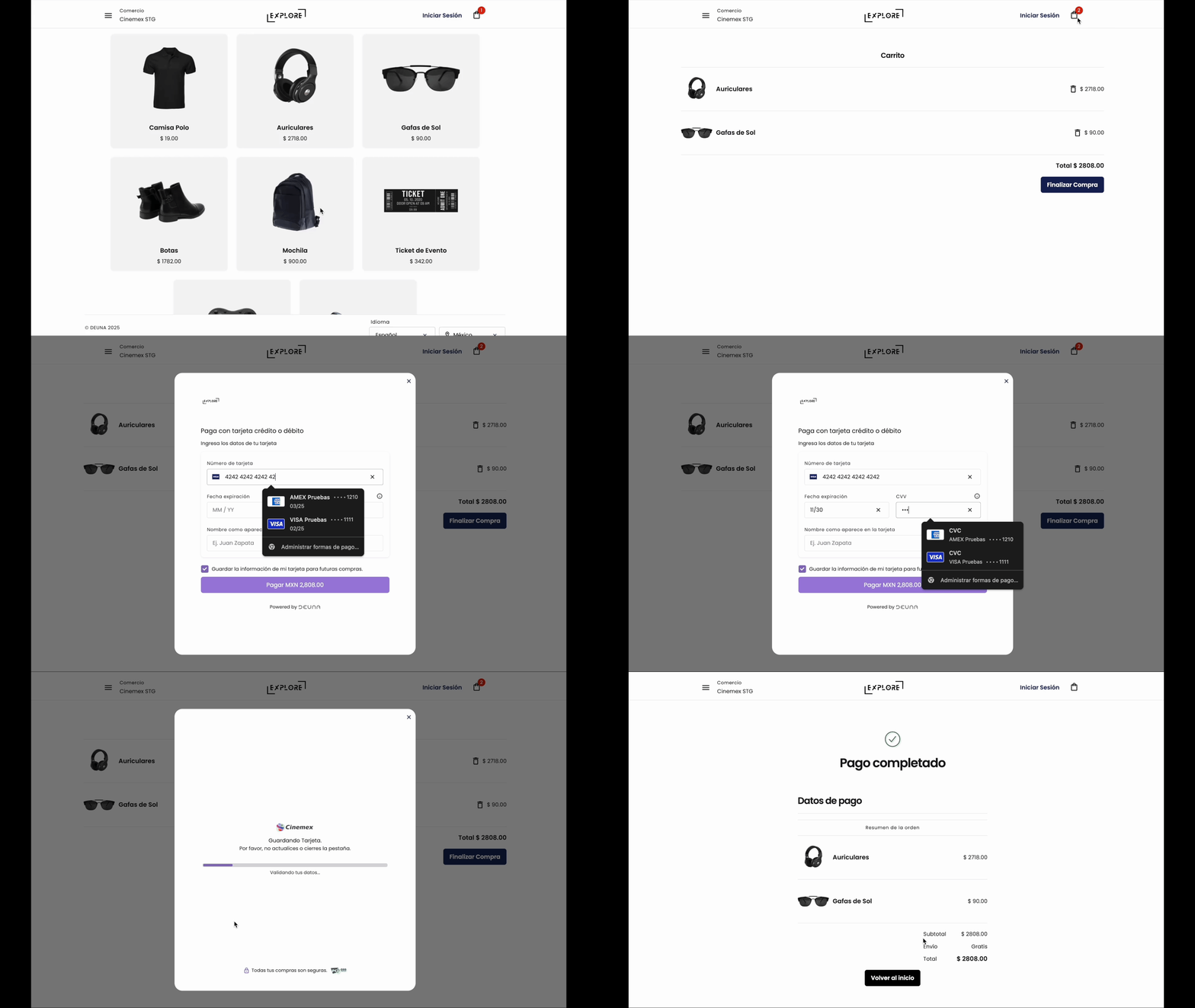
Demo
After integrating the Payment Vault, the experience is similar to the following demo:
Updated 6 months ago
Did this page help you?