

CyberSource
This page provides a comprehensive guide to successfully integrating Cybersource with DEUNA.
Cybersource is a global payment gateway by Visa that enables secure card-not-present payment processing. DEUNA integrates with Cybersource via REST API, supporting standard commerce flows and specialized Travel Industry processing with airline-specific data fields.
Supported Operations
- Authorization
- Capture (full and partial)
- Purchase (auto-capture)
- Cancel (Void)
- Refund (full and partial)
- Installments (only for MX)
- 3DS MPI
- Multiple partial captures and refunds can be enabled through configuration in the Admin
Supported Payment Methods
- Visa
- Mastercard
- American Express
- Diners
Active countries and currencies
- US (USD) and MX (MXN)
Integrate Cybersource
- Look for Cybersource in Connections in the Admin.
- Log in to your DEUNA Admin session.
- Click Connections.
- Search for Cybersource and click Connect.
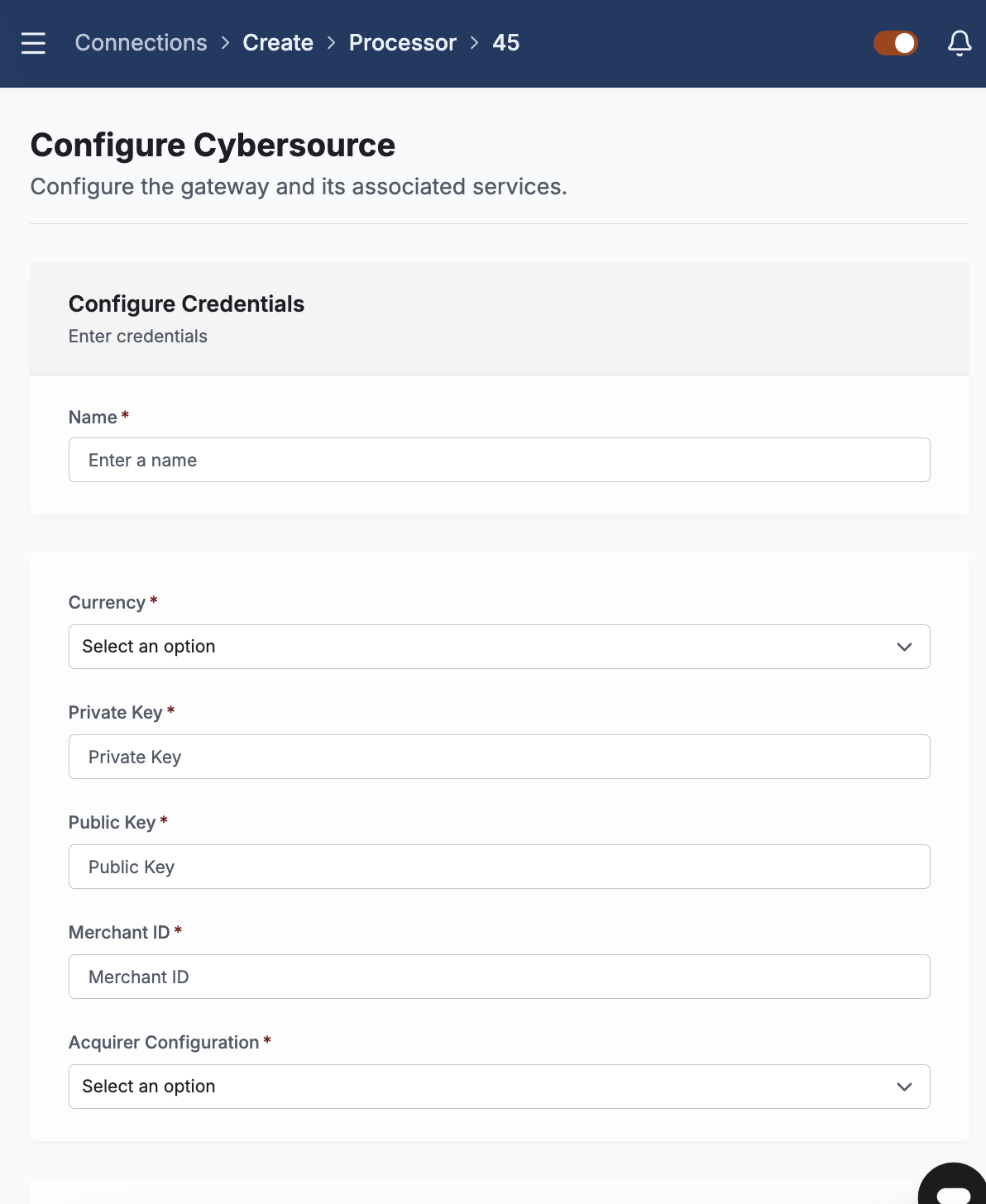
- In Connections, the Cybersource configuration panel will open. Enter the following:
- Name: Enter a name to reference this credential configuration.
- Currency: the currency used
- Private Key: Enter your Cybersource API Private Key.
- Public Key: Enter your public key.
- Merchant ID: Enter your Cybersource Merchant ID.
- Acquirer configuration(only for MX): The merchant can choose which processor to use. If none is specified, select the Default option.
- Operations: Choose the type of operation you want to perform: Purchase or Authorization
- Choose if you want to activate, DEUNA´s Multiple Partial Capture, Multiple Partial Refund and/or 3DS DEUNA.
- Click Connect.
Once finished, you get a confirmation message. You can now consult it within the Active Connections tab.
Travel Industry
- DEUNA supports processing for the airline and travel industry with Cyberosurce, enabling the submission of airline-specific data that qualifies transactions for improved interchange rates and compliance with card network requirements. _This is only available in the US market.
- Airline fields require Auth + Capture flow
- Submitting airline data fields (
orderType": "AIRLINE_ORDER") is only supported in the Capture step of an Authorization + Capture flow. - This is a Cybersource limitation, not a DEUNA limitation. The Purchase (auto-capture) operation does not support airline data fields.
- To use airline data: configure the connection in the Admin with Authorization as the operation type.
- Submitting airline data fields (
Required Fields – Airline Order
| DEUNA's Field | Description |
|---|---|
order.airline_information.booking_items.legs[].carrier_code | Airline carrier code for the flight segment. IATA 2 alphabetic characters. |
order.airline_information.booking_items.legs[].departure_date | Departure date of the flight segment. |
order.airline_information.booking_items.legs[].origin | Origin airport code. IATA 3 alphabetic characters. |
order.airline_information.booking_items.legs[].destination | Destination airport code. IATA 3 alphabetic characters |
order.airline_information.booking_items.legs[].fare_basis | Fare basis code associated with the ticket. Máx: 6 caracteres. |
order.airline_information.booking_items.passenger_name | Passenger name. |
order.airline_information.booking_items.pnr | Booking reference / PNR. |
Example:
{
  "order": {
    "airlineInformation": {
      "bookingItems": [
        {
          "legs": [
            {
              "carrierCode": "AM",
              "destination": {
                "date": "26-03-26",
                "iataCode": "MEX",
                "time": "11:50"
              },
              "fareBasisCode": "Y",
              "flightNumber": "411",
              "origin": {
                "date": "26-03-26",
                "iataCode": "EWR",
                "time": "08:01"
              },
              "serviceClass": "V",
              "stopoverCode": "O"
            },
          ],
          "passenger": {
            "firstName": "***dido",
            "lastName": "***chez",
            "type": "ADT"
          },
          "pnr": "CSOIUN"
        }
      ]
    },
    "billingAddress": {
      "address1": "***************3626",
      "address2": "***** 100",
      "addressType": "other",
      "city": "Sacramento",
      "countryCode": "PE",
      "createdAt": "2024-01-24T17:04:18.341610378Z",
      "email": "******[email protected]",
      "firstName": "Jean",
      "identityDocument": "*******5894",
      "lastName": "*mith",
      "phone": "********7761",
      "stateName": "LIM",
      "updatedAt": "2024-01-24T17:04:18.34161046Z",
      "zipcode": "95864"
    },
    "currency": "USD",
    "itemsTotalAmount": 200,
    },
    "orderId": "66cc4f9d-293c-41a7-af80-377360a26134",
    "subTotal": 200,
    "timezone": "America/Mexico_City",
    "totalAmount": 200,
    "webhookUrls": {
      "notifyOrder": "https://webhook.site/cadu"
    }
  },
  "orderType": "AIRLINE_ORDER"
}
Special considerations and limitantes
Asynchronous Processing and Status Updates
- Unlike synchronous processors, Cybersource does not return a definitive final status immediately after a transaction is submitted. Transactions will progress through intermediate statuses until final processing is complete.
- Cybersource runs its processing at night. During the day, the transactions will remain in
Processing,CapturingorRefundingstatus. - After the full process in the Cybersource side, DEUNA updates the transaction to its final status. Merchants should rely on DEUNA's transaction status endpoint to get the current state of a transaction.
Updated 16 days ago
Did this page help you?