

PIX with ASAAS

Getting Started with Pix
Within the Brazilian instant payment (IP) ecosystem, Banco Central do Brasil (BCB) created Pix, the Brazilian IP scheme that enables its users — people, companies and governmental entities — to send or receive payment transfers in few seconds at any time, including non-business days.
How it Works
Pix is an instant payment system that enables fast and secure bank transfers using banking apps or digital wallets. Users can make payments using a Pix key (such as a phone number, email address, or random code), by scanning a QR code, or by entering the recipient's account details.
Payment Flow
- Payment Selection: The shopper selects Pix as their payment method on your website or app.
- QR Code Generation: Your website or app generates and displays a unique QR code associated with the transaction.
- Payment Confirmation: The shopper accesses their banking app, scans or pastes the QR code, and confirms the payment. The transaction is processed instantly.
This seamless and efficient flow makes Pix an ideal solution for businesses seeking to offer fast, secure, and frictionless payment options.
Requirements
The following are the requirements for a successful integration with STP CoDi:
Credentials
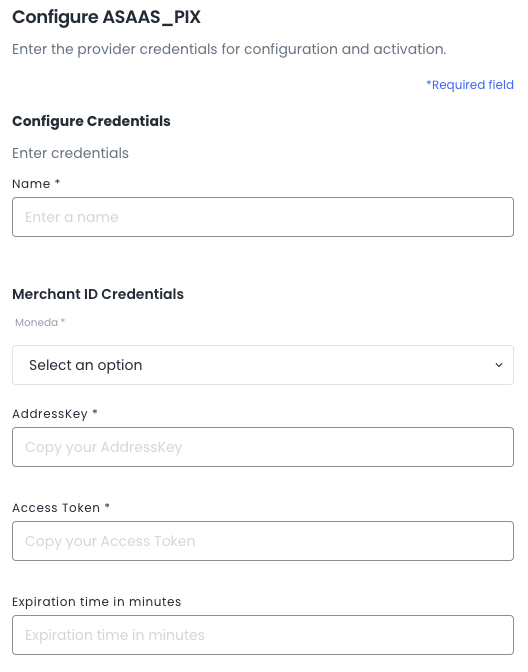
- Address Key
- Access Token
Environments:
- Sandbox: https://api.sandbox.deuna.io
- Production: https://api.deuna.io
Integration Steps
-
Add Asaas Pix to your Connections in the DEUNA Admin.
-
Enter your Business Provider credentials:
2. Create an order
To make a purchase, you must first create an order in DEUNA follow the steps to Create an Order. The API will return an order_token that is used throughout the flow.
3. Choose the integration type
After creating an order, you can process payments using our Payment Widget through any of our supported SDK platforms:
Updated about 2 months ago